

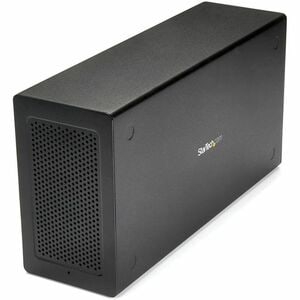
StarTech.com Thunderbolt 3 PCIe Expansion Chassis, External Enclosure Box With 1x PCI-Express Slot, 5K/4K Output Via TB3/DP Ports, Taa - Add An External PCI Express 3.0 X16 Slot And A DP Connection To A Thunderbolt 3 MacBook Or Laptop - Add A PCIe Card S
TB31PCIEX16
$645.00
| SKU: | 259644 |
|---|---|
| MPN: | TB31PCIEX16 Link |
| Manufacturer: | https://www.startechcom.com |
| Brand: | Startech |
| Warranty: | Standard Manufacturer's Warranty |
| Availability: | Preorder 2-3 weeks |
| Fright Estimate |

Description
▼
StarTech.com Thunderbolt 3 PCIe Expansion Chassis, External Enclosure Box with 1x PCI-Express Slot, 5K/4K Output Via TB3/DP Ports, TAA - Add an external PCI Express 3.0 x16 slot and a DP connection to a Thunderbolt 3 MacBook or laptop - Add a PCIe card such as an: SSD, Ethernet, Fiber, video capture, USB, FireWire, or eSATA card to a Thunderbolt 3 laptop - Thunderbolt 3 to PCIe
Specifications
▼
| Product Type | Expansion Chassis |
| Brand Name | StarTech.com |
| TAA Compliant | Yes |
| Product Color | Black |
| Manufacturer Part Number | TB31PCIEX16 |
| Manufacturer Website Address | http://www.startech.com/au |
| Packaged Quantity | 1 Each |
| Manufacturer | StarTech.com |
| Product Name | Thunderbolt 3 PCIe Expansion Chassis with DisplayPort - PCIe x16 |
| Additional Information | OS Compatibility: • Windows® 7, 8, 8.1, 10, 11 • macOS 10.12 - 10.15, 11.0, 12.0, 13.0 |
| Country of Origin | Taiwan |
| Environmentally Friendly | Yes |
| REACH Declaration URL | https://media.startech.com/cms/pdfs/tb31pciex16_rohs.pdf |
| EU RoHS Declaration URL | https://media.startech.com/cms/pdfs/tb31pciex16_rohs.pdf |
| End of Life Manual Availability | Yes |
| REACH free of SVHC | Yes |
| WEEE Statement | https://media.startech.com/cms/pdfs/tb31pciex16_weee.pdf |
| Weight (Approximate) | 1.63 kg |
| Form Factor | Desktop |
| Length | 279.4 mm |
| Height | 81.3 mm |
| Width | 142.2 mm |
| Color Family | Black |
| Product Material | Aluminium, Steel |
| Shipping Dimensions | Height 14.5, Width 28.7, Length 35.5, Shipping Weight 3.11 KG |
Vendor Info
▼
StarTech.com Thunderbolt 3 PCIe Expansion Chassis, External Enclosure Box with 1x PCI-Express Slot, 5K/4K Output Via TB3/DP Ports, TAA - Add an external PCI Express 3.0 x16 slot and a DP connection to a Thunderbolt 3 MacBook or laptop - Add a PCIe card such as an: SSD, Ethernet, Fiber, video capture, USB, FireWire, or eSATA card to a Thunderbolt 3 laptop - Thunderbolt 3 to PCIe
Reviews
▼
